Sistema visual de catálogo corporativo
Un sistema completo de diseño de catálogo corporativo que abarca portadas, perfil de empresa, productos, casos de uso y una vista previa unificada del libro completo.
Los modelos económicos no renderizan tipografía de forma fiable; este caso necesita un nivel superior.
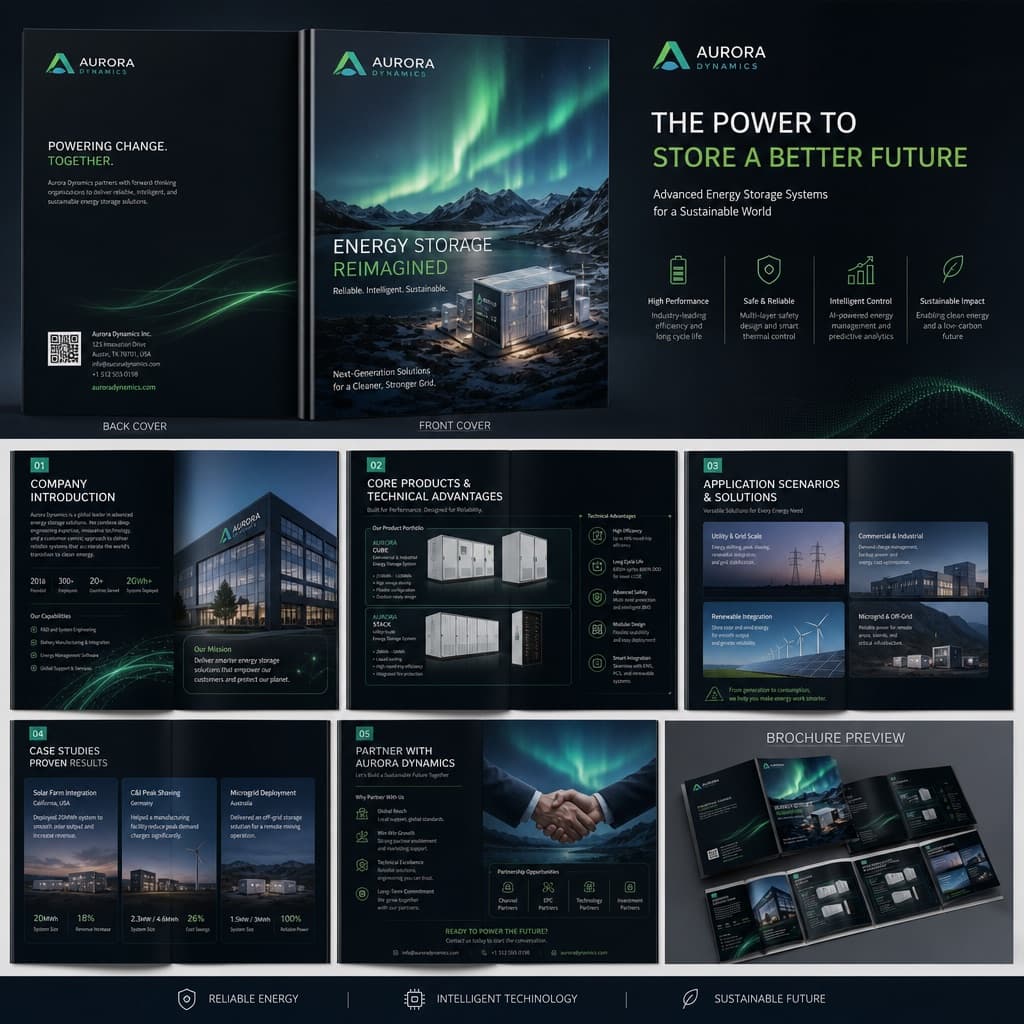
Imagen generada por nosotros con gpt-image-2. Prompt de @MrLarus
Prompt
Generate a complete enterprise-grade commercial brochure visual system for [BRAND_NAME], promoting its [INDUSTRY_PRODUCT_SOLUTION].

Overall style: high-end, professional, with strong visual impact; avoid the look of traditional Word layouts or ordinary PowerPoint slides. Use a [VISUAL_STYLE] aesthetic.

The brochure content should include:
1. Front and back cover
2. Company introduction and brand philosophy
3. Core products and technical advantages
4. Application scenarios and solutions
5. Client case studies and partnership methods
6. A full system preview spread of the whole brochure

Requirements: the layout must have strong design intent, with clear hierarchy among images, headlines, data, icons, and negative space; maintain a unified brand visual system across the entire brochure; emphasize the finish quality of real commercial print materials, avoiding simple text layouts.

Structural plan:
1. Front/back cover: establish the brand's presence, industry character, and overall visual tone.
2. Company introduction page: state the company's positioning, scope of capabilities, and target clients.
3. Product/technology page: showcase core products, technical strengths, and solutions.
4. Application scenario page: show which industries the product can be used in.
5. Case studies/partnership page: add credibility and business conversion information.
6. Full-book system preview: verify stylistic consistency and the systemic feel of the entire brochure.

If existing company materials are available, you may upload the previous brochure, company introduction documents, product manuals, website content, PowerPoint proposals, product photos, or case study images, so the process can accomplish three things:
1. Reorganize the content structure, determining which materials fit the cover, company introduction, product pages, case study pages, and partnership pages.
2. Extract a clear brochure storyline, avoiding a mere pile of materials, and instead building a coherent business narrative.
3. Unify the visual direction so the entire brochure looks like one consistent brand system, avoiding a patchwork feel between pages.

Pitfalls to avoid:
1. Avoid simply saying 'generate a brochure', as this tends to produce a generic template image.
2. Avoid stacking only text; the brochure must include product visuals, scenario photos, data modules, and clear design hierarchy.
3. Avoid generating only a single page; it's best to add a full-book preview image to convey a complete system feel.
Quedan 3 huecos sin rellenar. Si copias así, el generador dibujará los corchetes tal cual dentro de la imagen.
Variables editables
Cambia cualquier valor y el prompt se reescribe arriba. Copia el resultado ya listo.
El nombre de la empresa o marca que aparece en el catálogo.
El sector, producto o solución que se promociona en el catálogo.
La dirección estética visual general aplicada al catálogo (por ejemplo, tecnológico oscuro, minimalista blanco corporativo, industrial de alta gama o estilo de marca artístico).
Genera la imagen aquí
Con tu propia clave de OpenAI. Gratis para nosotros, lo que gastes es tuyo.
Se guarda solo en este navegador y va directa a la API de OpenAI: no pasa por ningún servidor nuestro, porque no hay ninguno en medio. Puedes comprobarlo en la pestaña de red del inspector.
Rellena las variables que quedan antes de generar: si no, el modelo dibujará los corchetes.