Sports Livestream Shopping Interface
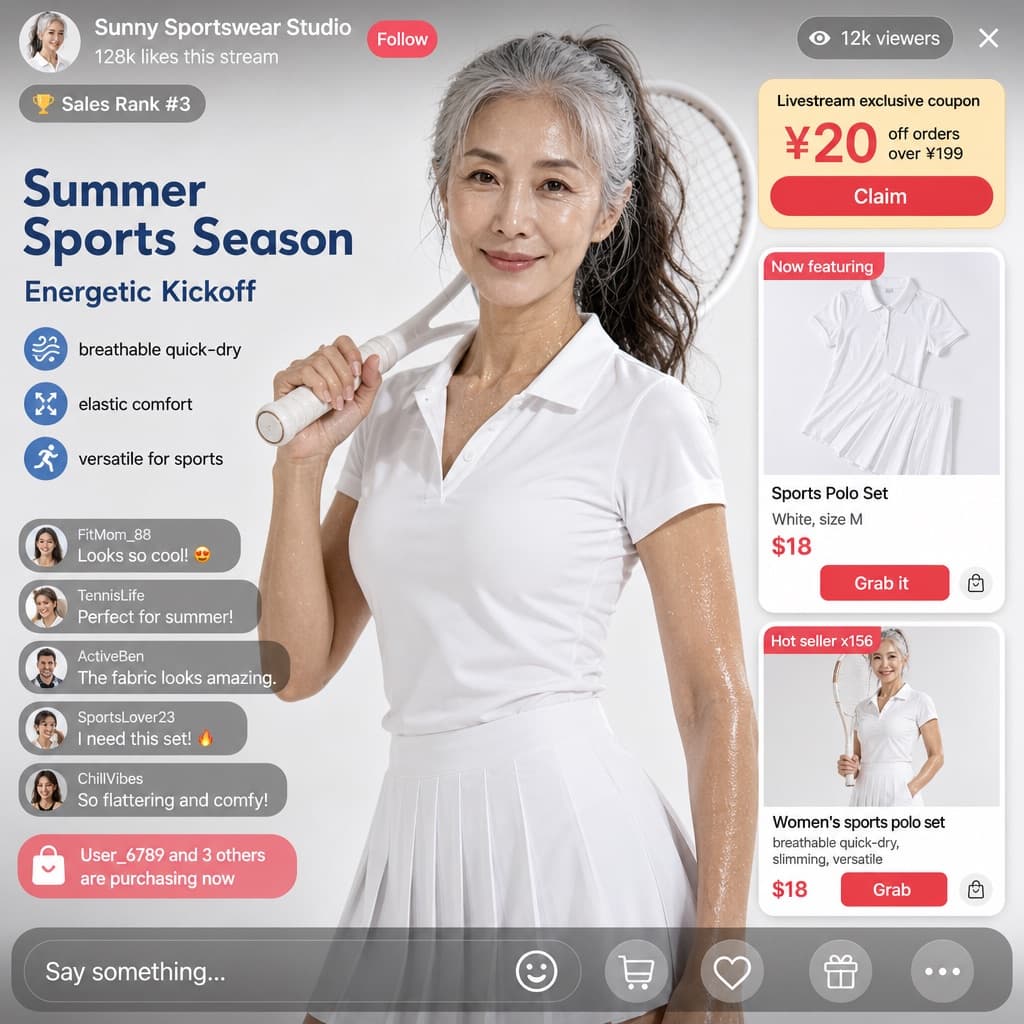
Realistic e-commerce livestream UI mockup featuring an athletic host, product cards, coupons, and a live chat overlay promoting sportswear.
Budget models do not render typography reliably; this case needs a higher tier.
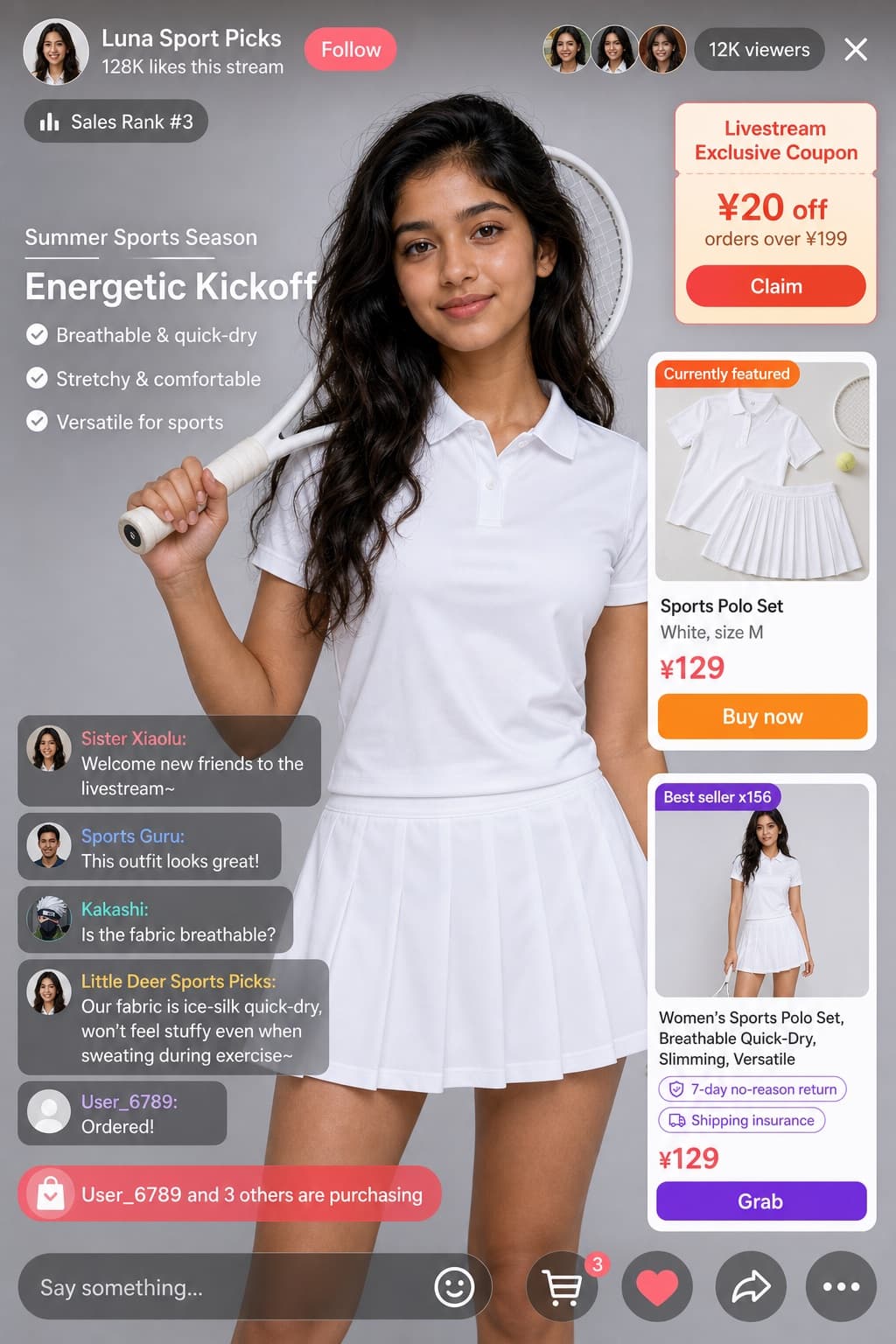
Image generated by us with gpt-image-2. Prompt by @coconut_256
Prompt
Create a realistic e-commerce livestream interface mockup with a UI/product photography style, formatted as a mobile app screenshot. All interface text, labels, and chat messages must be in [LANGUAGE].

Subject: [PERSON_LOOK] with long wavy dark hair, wearing a white short-sleeve polo shirt and a white pleated tennis skirt, holding a white tennis racket over her right shoulder, looking directly at the camera with a soft expression. Background: soft light grey studio background.

Header layout — left side: a circular female portrait avatar, host display name '[HOST_NAME]' (e.g. default 'Little Deer Sports Picks'), stats text '128K likes this stream', a 'Follow' button labeled 'Follow', and a badge reading 'Sales Rank #3'. Header right side: a cluster of 3 small viewer avatars, a viewer counter showing '12K viewers', and a close 'X' icon.

Floating UI elements over the video feed:
1. Top right — a coupon card titled 'Livestream Exclusive Coupon', with details '¥20 off orders over ¥199', and a 'Claim' button labeled 'Claim'.
2. Mid left — promotional campaign text with subtitle 'Summer Sports Season', a bold headline '[HEADLINE]' (e.g. default 'Energetic Kickoff'), and 3 bullet points: 'Breathable & quick-dry', 'Stretchy & comfortable', 'Versatile for sports'.
3. Mid right — an active product card with a badge reading 'Currently featured', a flat-lay image of the white polo and skirt, a title '[PRODUCT_NAME]' (e.g. default 'Sports Polo Set'), details 'White, size M', a price '[PRICE]' (e.g. default '¥129'), and a 'Buy now' button labeled 'Buy now'.
4. Bottom right — a secondary product card with a badge 'Best seller x156', an image of a model wearing the outfit, title 'Women's Sports Polo Set, Breathable Quick-Dry, Slimming, Versatile', tags '7-day no-reason return' and 'Shipping insurance', price '¥129', and a 'Grab' button labeled 'Grab'.

Chat overlay, bottom left, showing 5 stacked messages:
- 'Sister Xiaolu: Welcome new friends to the livestream~'
- 'Sports Guru: [CHAT_MESSAGE]' (e.g. default 'This outfit looks great!')
- 'Kakashi: Is the fabric breathable?'
- 'Little Deer Sports Picks: Our fabric is ice-silk quick-dry, won't feel stuffy even when sweating during exercise~'
- 'User_6789: Ordered!'
Below the chat, a purchase alert reads 'User_6789 and 3 others are purchasing'.

Footer: a text input bar reading 'Say something...', plus 5 icons: smile, shopping cart, heart, share, and more.
7 placeholders still empty. Copied as is, the generator will draw the brackets literally inside the image.
Editable variables
Change any value and the prompt rewrites above. Copy the finished result.
Display name of the livestream host shown in the top-left header.
Bold promotional headline shown in the mid-left campaign banner.
Name of the featured product shown on the active product card.
Price value with currency symbol displayed on the featured product card.
Comment from a viewer shown in the live chat overlay.
Physical appearance and ethnicity of the person featured in the livestream video, including age range and gender, to be substituted into the scene.
The language in which all text, labels, and messages inside the image should be written.
Generate the image here
With your own OpenAI key. Free for us, and what you spend is yours.
Kept in this browser only and sent straight to OpenAI's API: it never passes through a server of ours, because there is no server of ours in between. Check it yourself in the network tab.
Fill in the remaining variables before generating, or the model will draw the brackets.