Corporate Brochure Visual System
A complete enterprise-grade brochure design system covering covers, company profile, products, use cases, and a unified full-book preview.
Budget models do not render typography reliably; this case needs a higher tier.
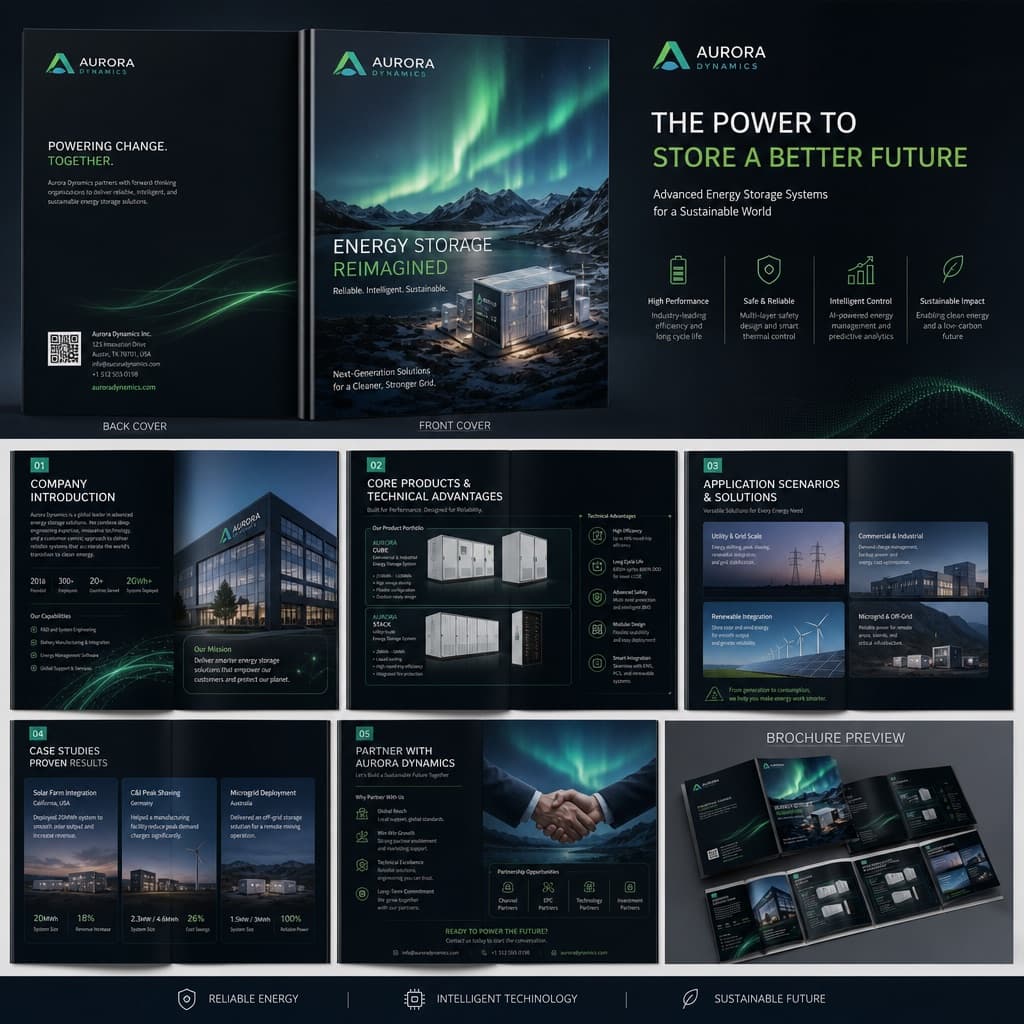
Image generated by us with gpt-image-2. Prompt by @MrLarus
Prompt
Generate a complete enterprise-grade commercial brochure visual system for [BRAND_NAME], promoting its [INDUSTRY_PRODUCT_SOLUTION].

Overall style: high-end, professional, with strong visual impact; avoid the look of traditional Word layouts or ordinary PowerPoint slides. Use a [VISUAL_STYLE] aesthetic.

The brochure content should include:
1. Front and back cover
2. Company introduction and brand philosophy
3. Core products and technical advantages
4. Application scenarios and solutions
5. Client case studies and partnership methods
6. A full system preview spread of the whole brochure

Requirements: the layout must have strong design intent, with clear hierarchy among images, headlines, data, icons, and negative space; maintain a unified brand visual system across the entire brochure; emphasize the finish quality of real commercial print materials, avoiding simple text layouts.

Structural plan:
1. Front/back cover: establish the brand's presence, industry character, and overall visual tone.
2. Company introduction page: state the company's positioning, scope of capabilities, and target clients.
3. Product/technology page: showcase core products, technical strengths, and solutions.
4. Application scenario page: show which industries the product can be used in.
5. Case studies/partnership page: add credibility and business conversion information.
6. Full-book system preview: verify stylistic consistency and the systemic feel of the entire brochure.

If existing company materials are available, you may upload the previous brochure, company introduction documents, product manuals, website content, PowerPoint proposals, product photos, or case study images, so the process can accomplish three things:
1. Reorganize the content structure, determining which materials fit the cover, company introduction, product pages, case study pages, and partnership pages.
2. Extract a clear brochure storyline, avoiding a mere pile of materials, and instead building a coherent business narrative.
3. Unify the visual direction so the entire brochure looks like one consistent brand system, avoiding a patchwork feel between pages.

Pitfalls to avoid:
1. Avoid simply saying 'generate a brochure', as this tends to produce a generic template image.
2. Avoid stacking only text; the brochure must include product visuals, scenario photos, data modules, and clear design hierarchy.
3. Avoid generating only a single page; it's best to add a full-book preview image to convey a complete system feel.
3 placeholders still empty. Copied as is, the generator will draw the brackets literally inside the image.
Editable variables
Change any value and the prompt rewrites above. Copy the finished result.
The name of the company or brand featured in the brochure.
The industry, product, or solution being promoted in the brochure.
The overall visual aesthetic direction applied to the brochure (e.g., dark tech, minimalist white business, high-end industrial, or artistic brand style).
Generate the image here
With your own OpenAI key. Free for us, and what you spend is yours.
Kept in this browser only and sent straight to OpenAI's API: it never passes through a server of ours, because there is no server of ours in between. Check it yourself in the network tab.
Fill in the remaining variables before generating, or the model will draw the brackets.