Long Hair Style Analysis Infographic
A clean, modern grooming infographic comparing flattering and unflattering long hairstyle options with detailed feature panels and color guides.
Budget models do not render typography reliably; this case needs a higher tier.
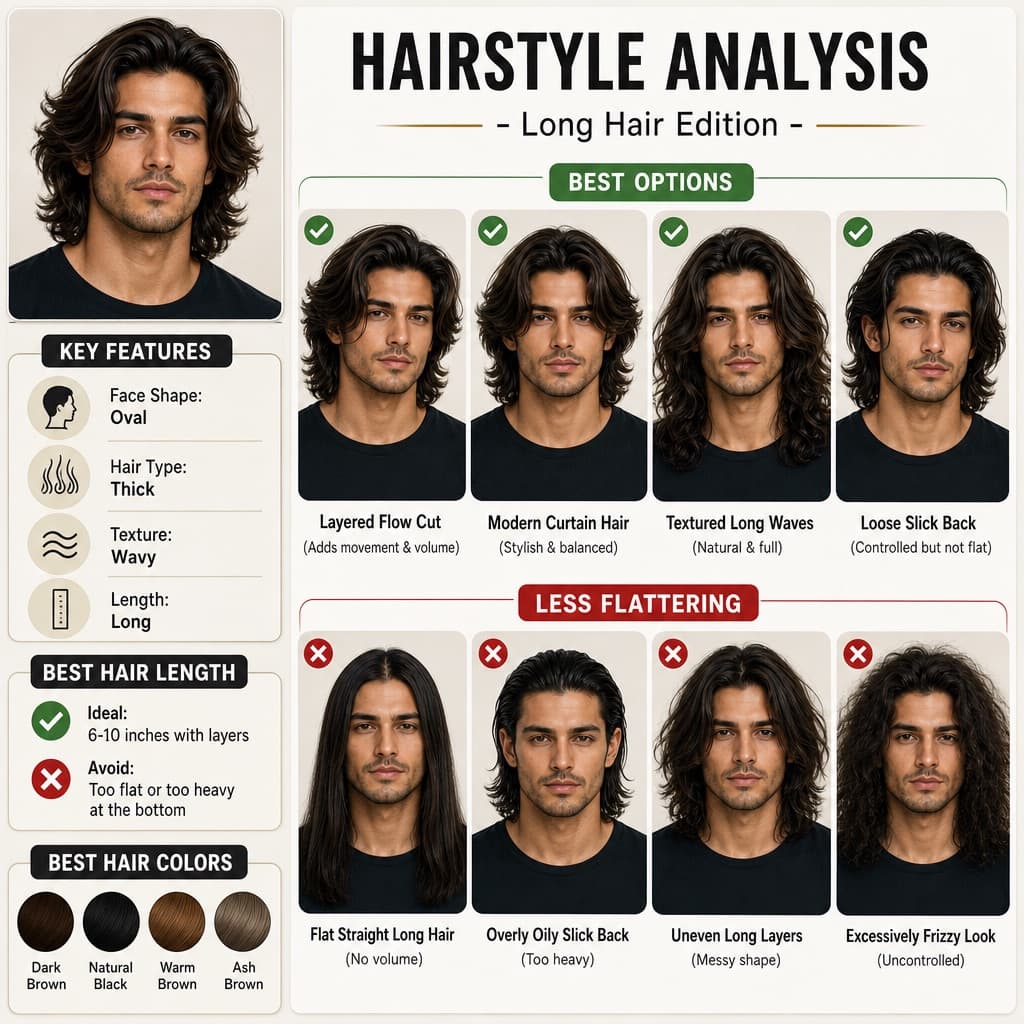
Image generated by us with gpt-image-2. Prompt by @Gemalpha_88
Prompt
Create a professional "[TITLE_TEXT]" infographic featuring a male model with long, thick hair (6-10 inches), slightly wavy texture, maintaining a consistent facial appearance across the design.

Style should be clean, modern, premium grooming guide (similar layout but not identical).

TOP TITLE:
"[TITLE_TEXT]"

LEFT PANEL (Key Features with icons):
Face Shape: [FACE_SHAPE]
Hair Type: Thick
Texture: Wavy
Length: Long

BEST OPTIONS (top row with green indicators):
Layered Flow Cut (Adds movement & volume)
Modern Curtain Hair (Stylish & balanced)
Textured Long Waves (Natural & full)
Loose Slick Back (Controlled but not flat)

LESS FLATTERING (bottom row with red indicators):
Flat Straight Long Hair (No volume)
Overly Oily Slick Back (Too heavy)
Uneven Long Layers (Messy shape)
Excessively Frizzy Look (Uncontrolled)

BEST HAIR LENGTH SECTION:
Ideal: [HAIR_LENGTH_RANGE] with layers
Avoid: Too flat or too heavy at the bottom

BEST HAIR COLORS:
Dark Brown
Natural Black
Warm Brown
Ash Brown

DESIGN STYLE:
Clean grid infographic
White/beige background
Soft shadows
Premium magazine look
Realistic face and hair detail
Consistent spacing and typography
High resolution, 4K
4 placeholders still empty. Copied as is, the generator will draw the brackets literally inside the image.
Editable variables
Change any value and the prompt rewrites above. Copy the finished result.
Main heading text displayed at the top of the infographic.
The facial shape category used to determine suitable hairstyles.
The recommended ideal hair length range shown in the infographic section.
Generate the image here
With your own OpenAI key. Free for us, and what you spend is yours.
Kept in this browser only and sent straight to OpenAI's API: it never passes through a server of ours, because there is no server of ours in between. Check it yourself in the network tab.
Fill in the remaining variables before generating, or the model will draw the brackets.