Bodegón de lanzamiento de mercancía
Fotografía de bodegón premium en showroom que anuncia un lanzamiento limitado de mercancía con prendas estilizadas, productos apilados y logotipo superpuesto.
Los modelos económicos no renderizan tipografía de forma fiable; este caso necesita un nivel superior.
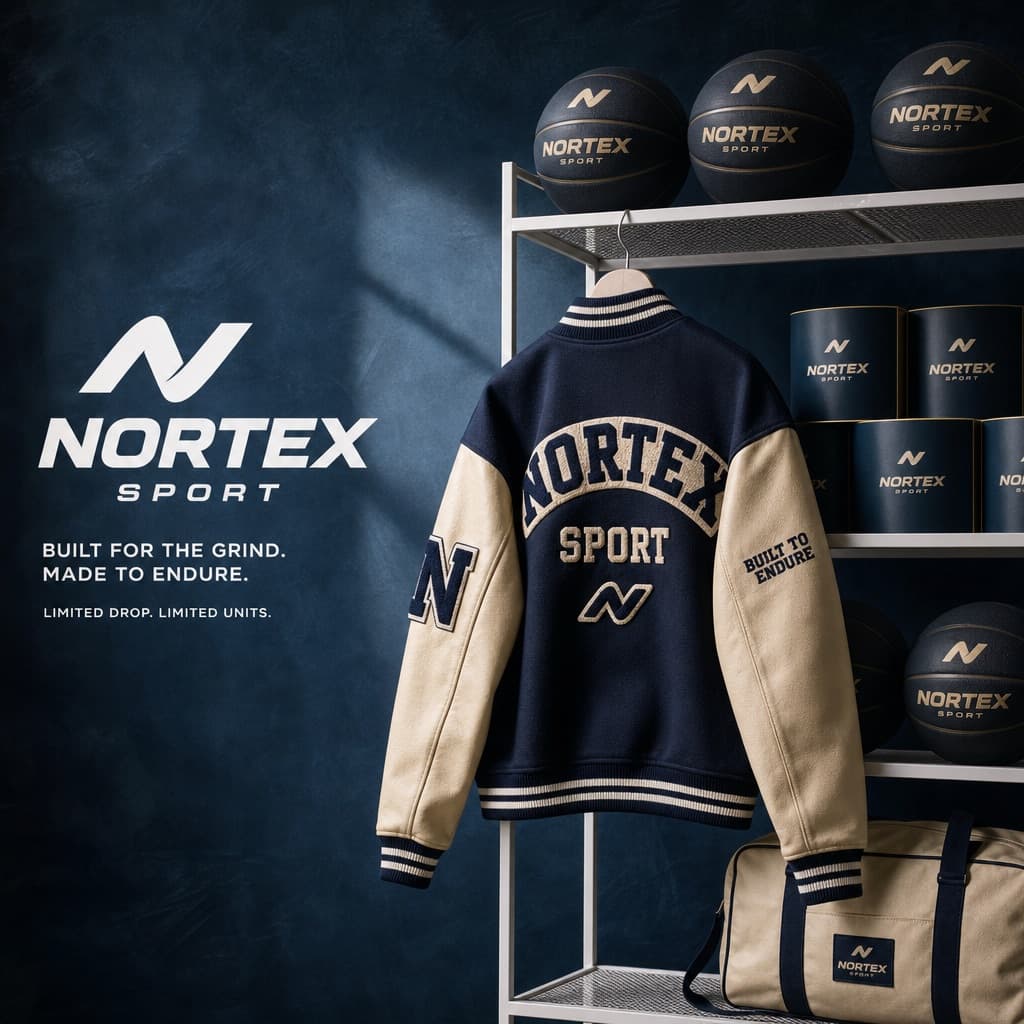
Imagen generada por nosotros con gpt-image-2.
Prompt
You are a Creative Director and still-life photographer for a high-fashion hypebeast magazine.

YOUR TASK:
Design a premium 'Showroom Still Life' image to announce a limited merchandise drop for [BRAND NAME].

STEP 1: BRAND ANALYSIS
Study [BRAND NAME]: identify its industry and signature physical product (for example, a sportswear brand might be represented by basketballs, a fast-food brand by burger packaging, or a payments brand by metal cards).
Choose the color palette:
- Background: a deep, rich, textured tone from the brand's secondary colors (teal, navy, burgundy, or slate grey).
- Merch accent: a warm or neutral tone (camel, orange, or cream) that pops against the backdrop.
- Apparel piece: select something that fits the brand's energy (varsity letterman jacket, heavyweight hoodie, canvas tote, or wool scarf).

STEP 2: SET DESIGN
Main prop: a clean, modern white powder-coated metal rack or shelving unit.
Layout:
- The apparel piece hangs casually from the rack or a hanger, showing off its texture.
- On the rack shelves, stack several units of the brand's core product (e.g., basketballs, cans, boxes).
- Backdrop: hand-painted canvas in the chosen deep background color, with visible brushstrokes for that studio aesthetic.

STEP 3: BRANDING DETAILS
Apparel: feature premium physical branding via chenille patches, embroidered logos, or screen print on the sleeve or back. It should look like a genuinely expensive garment.
Products: ensure the [BRAND NAME] logo is clearly visible on all stacked items.

STEP 4: PHOTOGRAPHY
Lighting: soft, directional side-window light with realistic soft shadows and rich texture highlights.
Focal length: 50mm or 85mm. Sharp focus on the merch, gentle background falloff.

STEP 5: GRAPHIC OVERLAY
Left-aligned composition:
- Large, clean white [BRAND NAME] logo placed in the negative space on the left.
- Beneath the logo, small white text with the brand's official tagline.
Quedan 4 huecos sin rellenar. Si copias así, el generador dibujará los corchetes tal cual dentro de la imagen.
Variables editables
Cambia cualquier valor y el prompt se reescribe arriba. Copia el resultado ya listo.
La marca ficticia o genérica cuyo lanzamiento de mercancía se muestra en la composición del bodegón.
Genera la imagen aquí
Con tu propia clave de OpenAI. Gratis para nosotros, lo que gastes es tuyo.
Se guarda solo en este navegador y va directa a la API de OpenAI: no pasa por ningún servidor nuestro, porque no hay ninguno en medio. Puedes comprobarlo en la pestaña de red del inspector.
Rellena las variables que quedan antes de generar: si no, el modelo dibujará los corchetes.