Diagrama de mesa óptica
Una infografía científica en 3D que muestra una mesa óptica con láser, lentes y componentes de polarización etiquetados para documentación de investigación.
Los modelos económicos no renderizan tipografía de forma fiable; este caso necesita un nivel superior.
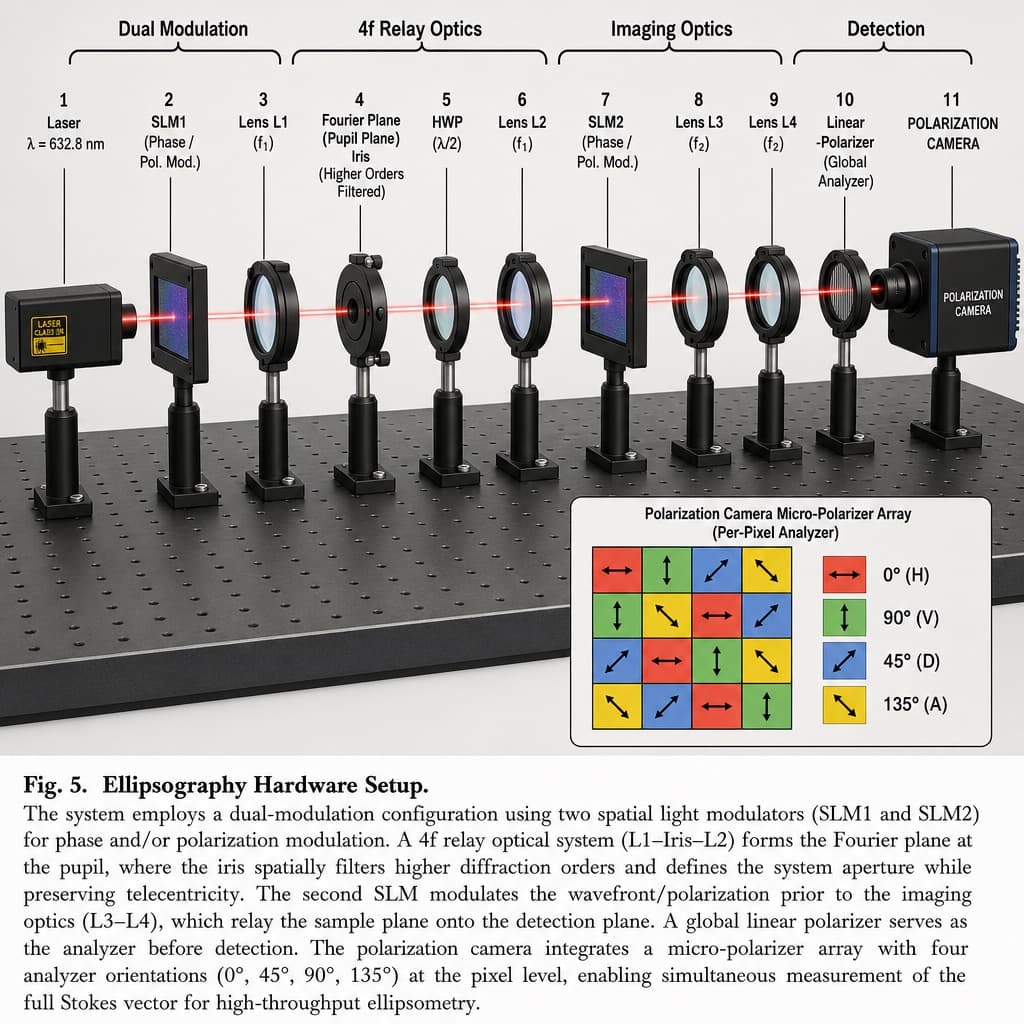
Imagen generada por nosotros con gpt-image-2. Prompt de @HumanOS_v2
Prompt
Create a 3D-rendered scientific hardware diagram in an infographic, realistic style, illustrating an optical table setup with a red laser beam passing through 11 aligned optical components mounted on black posts, arranged left to right.

Add labeled brackets across the top identifying four functional sections: 'Dual Modulation' spanning SLM1; '4f Relay Optics' spanning from Lens L1 to Lens L2; 'Imaging Optics' spanning from SLM2 to Lens L4; and 'Detection' spanning the Camera.

Arrange the optical components in this order from left to right, each with its label:
1. Laser, labeled 'Laser' and 'λ = [LASER_WAVELENGTH]'
2. SLM1, labeled 'SLM1' and '(Phase / Pol. Mod.)'
3. Lens L1, labeled 'Lens L1' and '(f1)'
4. Iris, labeled 'Fourier Plane', '(Pupil Plane)', 'Iris', and '(Higher Orders Filtered)'
5. HWP, labeled 'HWP' and '(λ/2)'
6. Lens L2, labeled 'Lens L2' and '(f1)'
7. SLM2, labeled 'SLM2' and '(Phase / Pol. Mod.)'
8. Lens L3, labeled 'Lens L3' and '(f2)'
9. Lens L4, labeled 'Lens L4' and '(f2)'
10. Linear Polarizer, labeled 'Linear', '-Polarizer', and '(Global Analyzer)'
11. Polarization Camera, labeled 'POLARIZATION CAMERA'

In the bottom-right corner, include an inset box titled 'Polarization Camera Micro-Polarizer Array (Per-Pixel Analyzer)' showing a 4x4 grid of colored squares with directional arrows, accompanied by a 4-item legend:
- Red square with horizontal arrow, labeled '0° (H)'
- Green square with vertical arrow, labeled '90° (V)'
- Blue square with diagonal arrow, labeled '45° (D)'
- Yellow square with diagonal arrow, labeled '135° (A)'

At the bottom of the image, include a figure caption starting with '[FIGURE_NUMBER]' followed by the bold title '[SYSTEM_NAME]', and a paragraph of scientific explanatory text describing the dual-modulation configuration, 4f relay optics, and polarization camera setup.
Quedan 3 huecos sin rellenar. Si copias así, el generador dibujará los corchetes tal cual dentro de la imagen.
Variables editables
Cambia cualquier valor y el prompt se reescribe arriba. Copia el resultado ya listo.
El valor de longitud de onda de la fuente de luz láser mostrada en el diagrama.
El número de figura utilizado en el pie de imagen científico.
El nombre del sistema óptico descrito en el título del pie de imagen.
Genera la imagen aquí
Con tu propia clave de OpenAI. Gratis para nosotros, lo que gastes es tuyo.
Se guarda solo en este navegador y va directa a la API de OpenAI: no pasa por ningún servidor nuestro, porque no hay ninguno en medio. Puedes comprobarlo en la pestaña de red del inspector.
Rellena las variables que quedan antes de generar: si no, el modelo dibujará los corchetes.