Volumetric Laser Black Poster
A cinematic black-stage poster where six volumetric laser planes slice through darkness, revealing a subject at their radiant intersection.
Budget models do not render typography reliably; this case needs a higher tier.
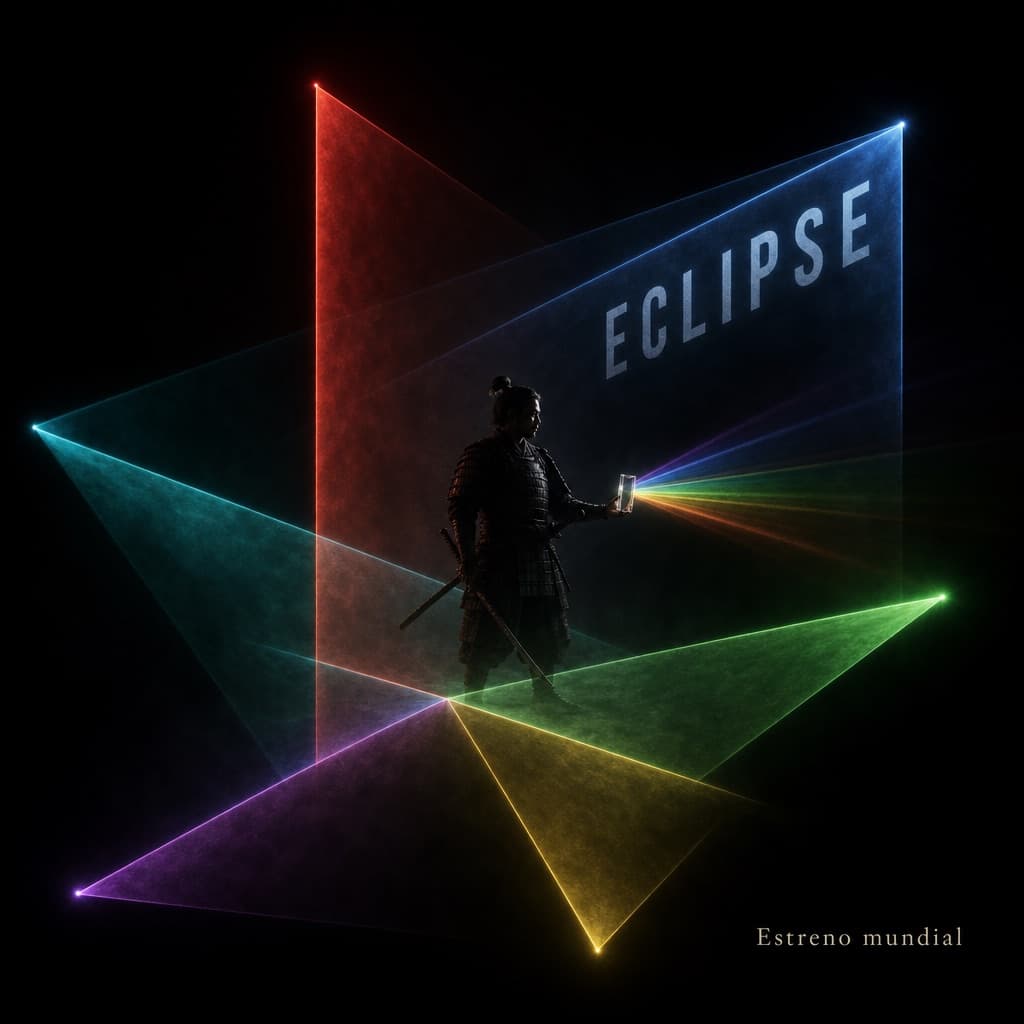
Image generated by us with gpt-image-2. Prompt by @zhidawang219555
Prompt
Start in a completely black theater/stage void. Like slicing a specimen, use six real volumetric laser planes to layer the space. Each light plane must have a clear point of origin, defined perspective, and visible thickness within haze. [SUBJECT] stands at the intersection point of the light planes, holding a transparent prop that refracts a small fan of differently-colored light. The composition progresses along a diagonal axis from bottom-left to top-right; the face is revealed only through a single restrained rim light. The title text '[TITLE_TEXT]' shares the same perspective as one of the light planes, while the smaller text '[SUBTITLE_TEXT]' remains in the pure black negative space. Whenever the subject or character changes, the image must not degrade into a nightclub flyer template, a HUD/UI overlay, a neon cityscape, or light sources lacking a physical origin.
3 placeholders still empty. Copied as is, the generator will draw the brackets literally inside the image.
Editable variables
Change any value and the prompt rewrites above. Copy the finished result.
The main character or figure standing at the intersection of the laser planes.
The main title text displayed sharing perspective with one of the light planes.
Small supporting text placed within the pure black negative space of the poster.
Generate the image here
With your own OpenAI key. Free for us, and what you spend is yours.
Kept in this browser only and sent straight to OpenAI's API: it never passes through a server of ours, because there is no server of ours in between. Check it yourself in the network tab.
Fill in the remaining variables before generating, or the model will draw the brackets.