Sculptural Fruit Packaging Design
A photorealistic product shot of eco-friendly, fruit-shaped cardboard packaging with bold duo-tone patterns and die-cut windows.
Budget models do not render typography reliably; this case needs a higher tier.
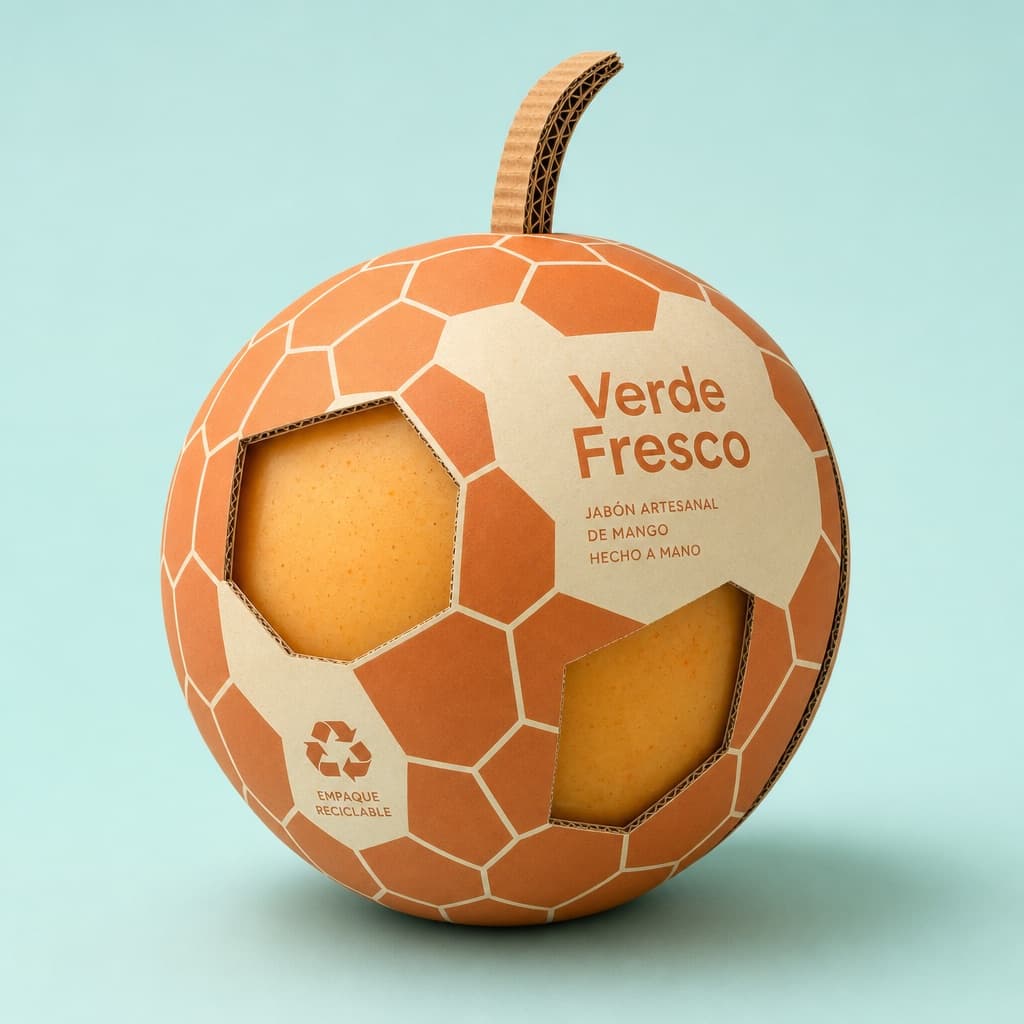
Image generated by us with gpt-image-2.
Prompt
Professional product photography of a sculptural packaging design created for [FRUIT_NAME]. The box is made of premium corrugated cardboard, shaped and cut into the exact silhouette of a giant [SHAPE] [FRUIT_NAME].

The outer surface is printed with a bold, minimal [PATTERN] pattern that echoes the natural skin texture, rendered in a duo-tone color scheme of [COLOR_1] and [COLOR_2].

Die-cut window panels expose the [PRODUCT_INSIDE] nestled inside. Clean modern sans-serif text on the side reads "[BRAND_NAME]". Eco-friendly details include a recycling icon and a sculpted corrugated [STEM_ELEMENT] on top.

Soft diffused studio lighting, gentle drop shadows, set against a solid pastel [BACKGROUND_COLOR] background. 8K, photorealistic, cinematic framing, industrial design aesthetic.
10 placeholders still empty. Copied as is, the generator will draw the brackets literally inside the image.
Editable variables
Change any value and the prompt rewrites above. Copy the finished result.
The fruit whose silhouette and texture inspire the packaging design.
The overall shape category of the packaging silhouette.
The graphic pattern style printed on the outer surface.
The first color used in the duo-tone print scheme.
The second color used in the duo-tone print scheme.
The product visible through the die-cut window panels.
The fictional brand name printed on the side of the package.
The sculpted corrugated element placed on top of the package.
The solid pastel background color behind the product shot.
Generate the image here
With your own OpenAI key. Free for us, and what you spend is yours.
Kept in this browser only and sent straight to OpenAI's API: it never passes through a server of ours, because there is no server of ours in between. Check it yourself in the network tab.
Fill in the remaining variables before generating, or the model will draw the brackets.