Optical Table Diagram Setup
A detailed 3D scientific infographic depicting a labeled optical table with laser, lenses, and polarization components for research documentation.
Budget models do not render typography reliably; this case needs a higher tier.
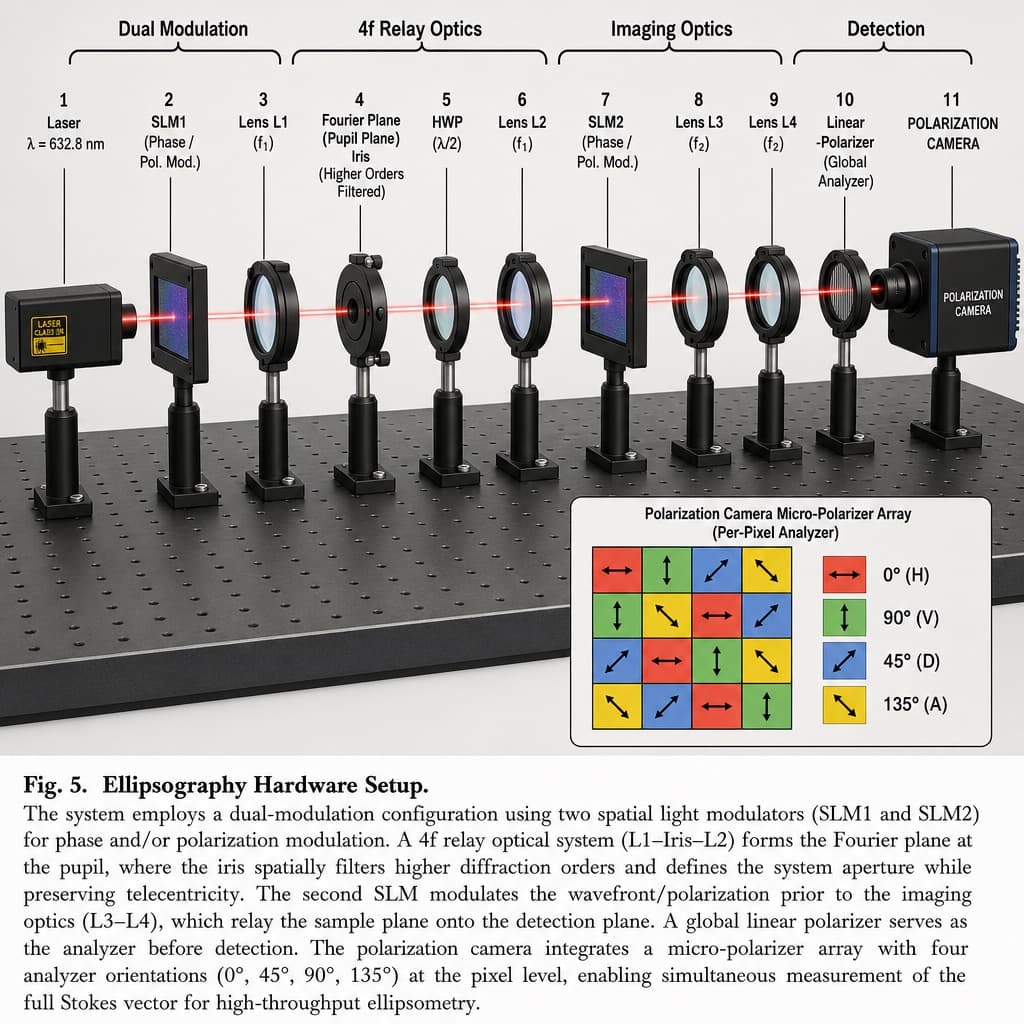
Image generated by us with gpt-image-2. Prompt by @HumanOS_v2
Prompt
Create a 3D-rendered scientific hardware diagram in an infographic, realistic style, illustrating an optical table setup with a red laser beam passing through 11 aligned optical components mounted on black posts, arranged left to right.

Add labeled brackets across the top identifying four functional sections: 'Dual Modulation' spanning SLM1; '4f Relay Optics' spanning from Lens L1 to Lens L2; 'Imaging Optics' spanning from SLM2 to Lens L4; and 'Detection' spanning the Camera.

Arrange the optical components in this order from left to right, each with its label:
1. Laser, labeled 'Laser' and 'λ = [LASER_WAVELENGTH]'
2. SLM1, labeled 'SLM1' and '(Phase / Pol. Mod.)'
3. Lens L1, labeled 'Lens L1' and '(f1)'
4. Iris, labeled 'Fourier Plane', '(Pupil Plane)', 'Iris', and '(Higher Orders Filtered)'
5. HWP, labeled 'HWP' and '(λ/2)'
6. Lens L2, labeled 'Lens L2' and '(f1)'
7. SLM2, labeled 'SLM2' and '(Phase / Pol. Mod.)'
8. Lens L3, labeled 'Lens L3' and '(f2)'
9. Lens L4, labeled 'Lens L4' and '(f2)'
10. Linear Polarizer, labeled 'Linear', '-Polarizer', and '(Global Analyzer)'
11. Polarization Camera, labeled 'POLARIZATION CAMERA'

In the bottom-right corner, include an inset box titled 'Polarization Camera Micro-Polarizer Array (Per-Pixel Analyzer)' showing a 4x4 grid of colored squares with directional arrows, accompanied by a 4-item legend:
- Red square with horizontal arrow, labeled '0° (H)'
- Green square with vertical arrow, labeled '90° (V)'
- Blue square with diagonal arrow, labeled '45° (D)'
- Yellow square with diagonal arrow, labeled '135° (A)'

At the bottom of the image, include a figure caption starting with '[FIGURE_NUMBER]' followed by the bold title '[SYSTEM_NAME]', and a paragraph of scientific explanatory text describing the dual-modulation configuration, 4f relay optics, and polarization camera setup.
3 placeholders still empty. Copied as is, the generator will draw the brackets literally inside the image.
Editable variables
Change any value and the prompt rewrites above. Copy the finished result.
The wavelength value of the laser light source shown in the diagram.
The figure number label used in the scientific caption.
The name of the optical hardware system described in the caption title.
Generate the image here
With your own OpenAI key. Free for us, and what you spend is yours.
Kept in this browser only and sent straight to OpenAI's API: it never passes through a server of ours, because there is no server of ours in between. Check it yourself in the network tab.
Fill in the remaining variables before generating, or the model will draw the brackets.