Multi-Industry 2x2 Ad Grid
A 2x2 advertising banner grid featuring skincare, restaurant, travel, and app ads, each with its own distinct visual style and headline copy.
Budget models do not render typography reliably; this case needs a higher tier.
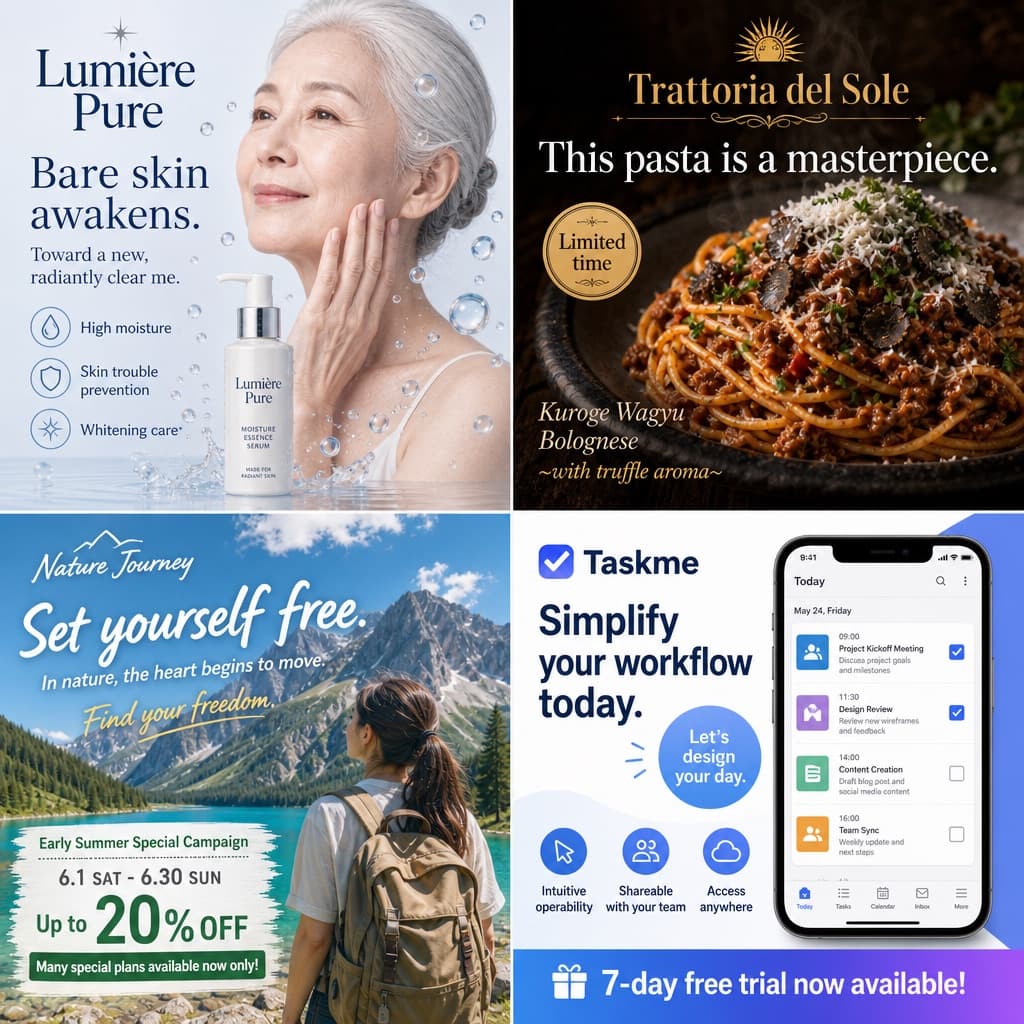
Image generated by us with gpt-image-2. Prompt by @kitune_fire45
Prompt
Design a 2x2 advertising banner grid layout composed of 4 distinct quadrants, each showcasing a different industry advertisement with its own visual style and typography treatment.

Top-left quadrant (Skincare): Show a [PERSON_LOOK] gently touching her cheek, surrounded by floating water droplets, with a white pump bottle placed in the composition. The brand name [SKINCARE_BRAND] appears prominently. Headline text (in [LANGUAGE]): [SKINCARE_HEADLINE] (default: 'Bare skin awakens.'), with subheadline 'Toward a new, radiantly clear me.' and three feature labels: 'High moisture', 'Skin trouble prevention', 'Whitening care*'.

Top-right quadrant (Restaurant/Food): Feature a close-up shot of spaghetti bolognese topped with grated cheese and fresh parsley, lit with dark, moody lighting for a premium feel. The brand name [RESTAURANT_BRAND] is displayed. Headline text (in [LANGUAGE]): [FOOD_HEADLINE] (default: 'This pasta is next level.'), with a limited-time badge reading 'Limited time' and description text 'Kuroge Wagyu Bolognese ~with truffle aroma~'.

Bottom-left quadrant (Travel): Depict a woman wearing a backpack facing a scenic mountain lake under bright daylight. The brand name [TRAVEL_BRAND] appears. Headline text (in [LANGUAGE]): [TRAVEL_HEADLINE] (default: 'A journey that sets me free.'), subheadline 'In nature, the heart begins to move.', script text 'Find your freedom.', and banner details listing: 'Early Summer Special Campaign', '6.1 SAT - 6.30 SUN', 'Up to 20% OFF', 'Many special plans available now only!'.

Bottom-right quadrant (SaaS App): Display a smartphone screen showing a task management app interface with 4 schedule items visible. The app brand name is [APP_BRAND] (default: 'Taskme'). Headline text (in [LANGUAGE]): [APP_HEADLINE] (default: 'Make task management simpler and smarter.'), with a circular badge reading 'Let's design your day.', three feature labels: 'Intuitive operability', 'Shareable with your team', 'Access anywhere', and a bottom banner reading '7-day free trial now available!'.

Maintain clean commercial ad design conventions in each quadrant, with distinct color palettes and typography suited to each industry (skincare: soft pastel and clean whites; food: warm dark moody tones; travel: bright natural daylight tones; SaaS: modern flat UI colors).
13 placeholders still empty. Copied as is, the generator will draw the brackets literally inside the image.
Editable variables
Change any value and the prompt rewrites above. Copy the finished result.
Fictional skincare brand name displayed in the top-left quadrant.
Japanese headline text used for the skincare advertisement.
Fictional restaurant brand name displayed in the top-right quadrant.
Japanese headline text used for the restaurant food advertisement.
Fictional travel brand name displayed in the bottom-left quadrant.
Japanese headline text used for the travel advertisement.
Fictional SaaS app brand name displayed in the bottom-right quadrant.
Japanese headline text used for the SaaS task management app advertisement.
The language in which all text rendered inside the image (headlines, subheadlines, labels, badges, banners) should be written.
Physical appearance, age, sex and ethnic origin of the person shown touching her cheek in the skincare quadrant; should look natural under soft, clean lighting suited to a beauty product close-up.
Generate the image here
With your own OpenAI key. Free for us, and what you spend is yours.
Kept in this browser only and sent straight to OpenAI's API: it never passes through a server of ours, because there is no server of ours in between. Check it yourself in the network tab.
Fill in the remaining variables before generating, or the model will draw the brackets.